Your bookings, at a glance
Today's appointments, upcoming bookings, pending confirmations, and revenue summaries on a single dashboard. Confirm, reschedule, or cancel each booking in one click from any device.
Free plan available. Pro from R79/month.
Built for real service businesses
Less admin, faster decisions, and every booking one tap away on your phone between clients.
Today at a glance
See who is booked in today, at what time, with which team member, and whether deposits have been paid.
Upcoming bookings
Next 7, 30, or 90 days in one list. Filter by team member, by service, or by payment status.
One-click actions
Confirm, reschedule, cancel, or mark no-show in one tap. Client is notified automatically via email and WhatsApp.
Auto-confirm mode
Bookings can auto-confirm, or you can keep a manual review step. Useful when paid deposits should auto-confirm and free bookings need a check.
Revenue summary
Bookings booked, bookings completed, deposits collected. Pick any date range to see monthly, weekly, or year-to-date income in ZAR.
Works on your phone
Dashboard is responsive so you can manage bookings between clients without sitting down at a laptop.
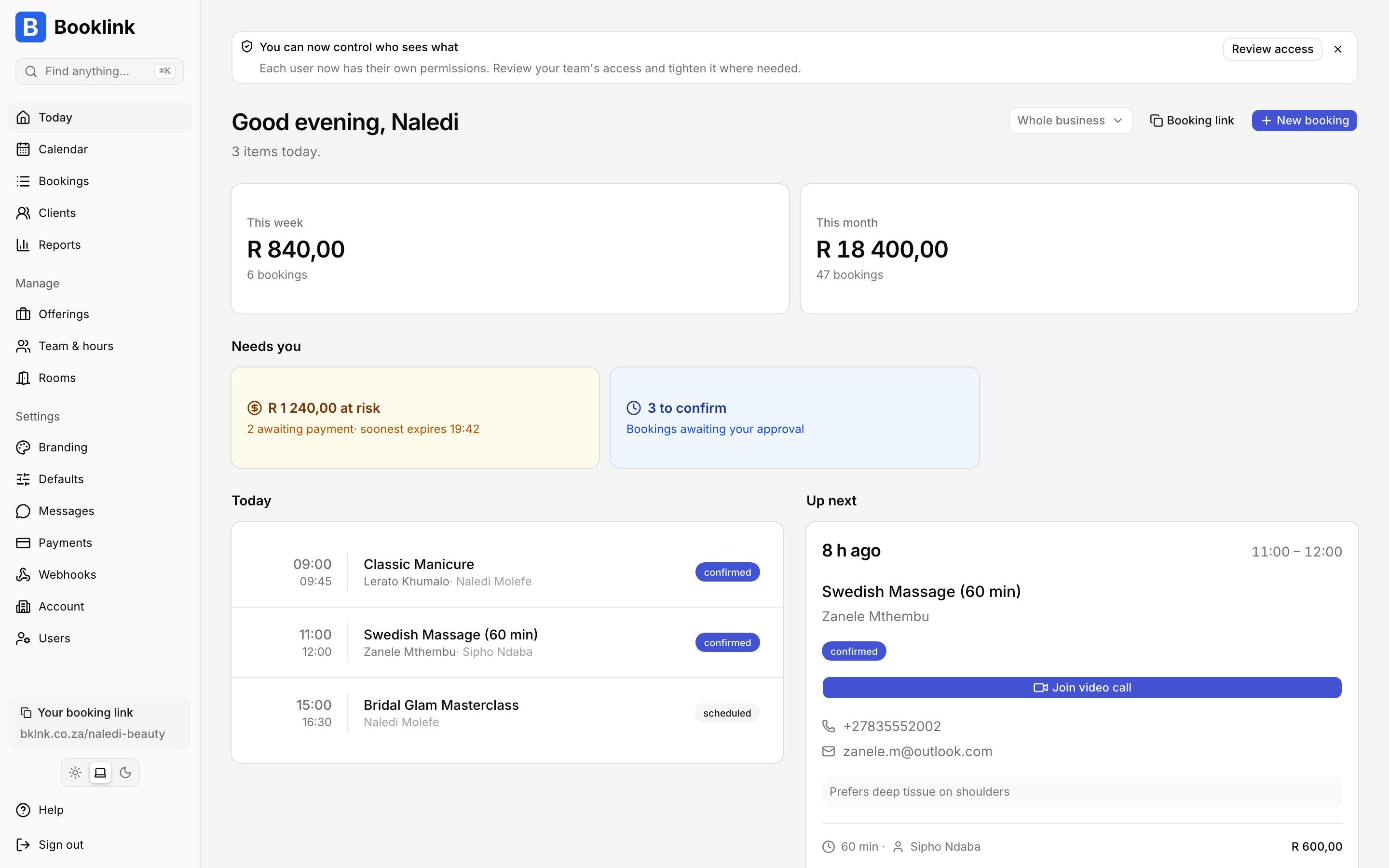
Today's appointments, upcoming bookings, and revenue in ZAR - all in one view.
In one paragraph
What does the Booklink dashboard show?
The Booklink dashboard is the single place where a South African service provider runs their day. The landing view shows today's appointments in chronological order, with the client's name, the service, the team member, the deposit status, and a one-click action to confirm, reschedule, mark no-show, or cancel. A second view lists upcoming bookings across the next week, month, or a custom date range, filterable by team member or by service. Each booking links to the client's full history (previous bookings, notes, no-show flags) and to a reminder log that shows which WhatsApp and email messages were sent and delivered. Revenue panels summarise bookings booked, bookings completed, and deposits collected in ZAR over any date range, so owners can answer "how did March go?" without spreadsheets. Pro accounts let each team member log in and see only their own bookings, while the owner retains a full view. The whole dashboard is responsive and works well on mobile, because most owners check between clients rather than at a desk.
Frequently asked questions
Can each team member log in?
Does the dashboard work on mobile?
Can I export my bookings?
Can I auto-confirm bookings?
Explore more Booklink features
New to online booking? Read the full online booking guide for South African businesses.
See your whole diary in one dashboard
Free plan available. No credit card. Takes under a minute to set up.
Create your free account