Reports and commissions
Know what the day made and what each person is owed.
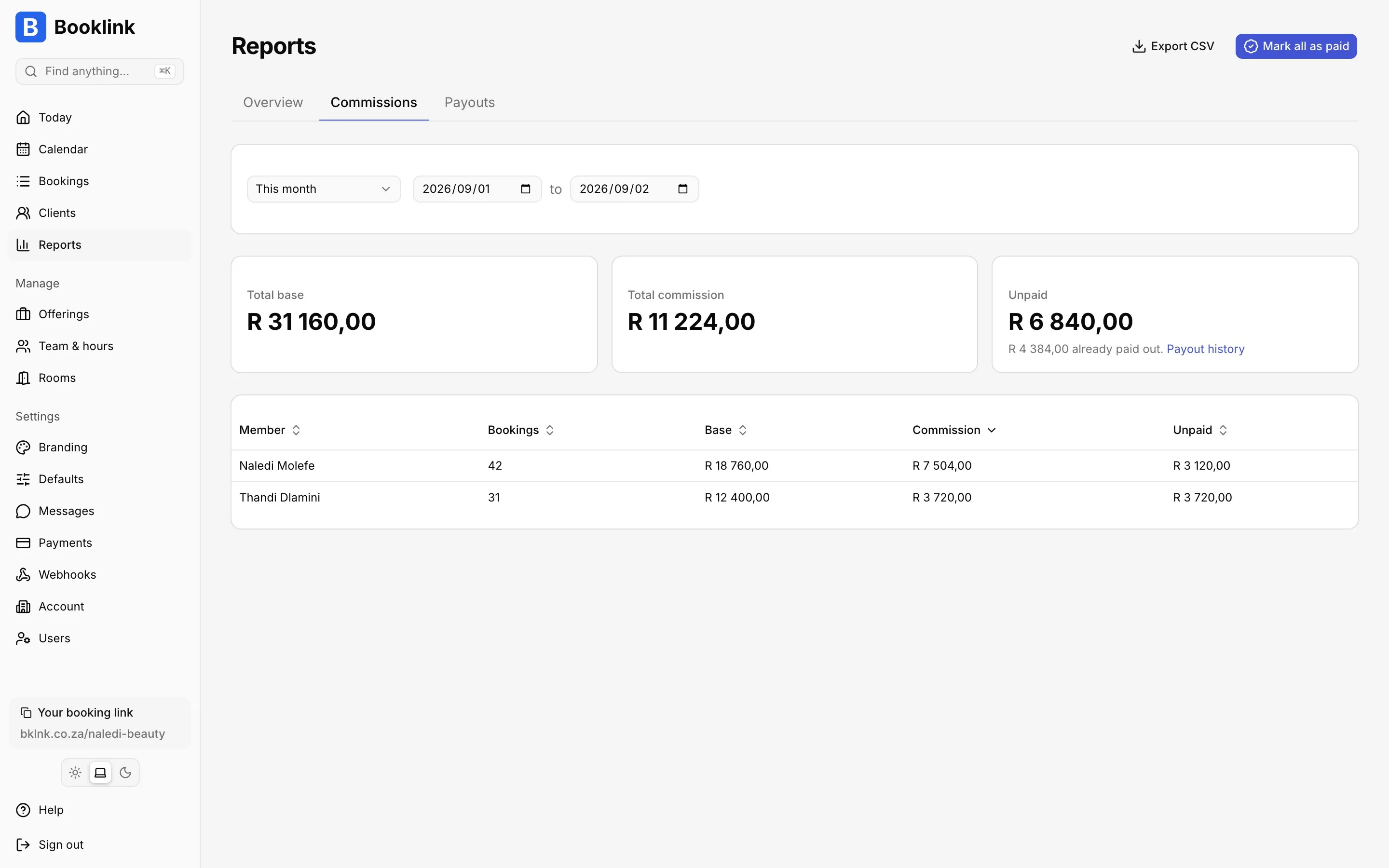
Reports show bookings and revenue by day, by month and by team member, either as booked value or as money actually collected. Commission rules turn that into what each team member earned, and payouts record when you paid them.
Commission rules, the commissions report and payouts are on every plan. The daily, monthly and team member reports are included in Pro at R79 a month.
Setting it up: The Reports page in the help centre.
What the reports cover
Daily
Every booking for a day with its status, service, team member and value. The fastest way to close the till.
Monthly
Bookings, cancellations and revenue for the month, in your own timezone, ready for the accountant or for Rebill.
Per team member
Pick a person and a date range. See their bookings, their value and their share.
Booked or collected
Flip between the value of confirmed bookings and the money that has actually arrived through your gateway.
Commission rules
A percentage or a fixed amount per booking, set per team member, with overrides per service. Commission accrues once a booking is confirmed and has taken place.
Payouts and CSV
Mark a period as paid per team member so unpaid commission never counts twice, with a payout history per person and an undo for mistakes. Export the commission report as CSV.
Coupons in the numbers
The daily, monthly and team member reports show what coupon codes took off, and each coupon lists the bookings that used it. Sale prices are already in the price the client paid, so commission is worked out after the discount.
Payments on every booking
Deposits, balances and in-person payments recorded on a booking sit next to the online payments, so the balance due on each booking is always clear.
In one paragraph
What reports does Booklink have?
Booklink has daily, monthly and per-team-member reports on bookings and revenue, with a toggle between booked value and money collected. Commission rules, set per team member as a percentage or fixed amount with per-service overrides, produce a commissions report that accrues when a booking is confirmed and completed. Payouts record what has been paid to each team member and the report exports to CSV. The reports also show the discounts given through coupon codes. Commission rules, the commissions report and payouts are available on every plan; the daily, monthly and team member reports are a Pro feature at R79 a month.
Questions about reports and commissions
When does commission count?
When the booking is confirmed and its end time has passed. Cancelled and pending bookings never earn commission.
Can different services pay different commission?
Yes. Each team member has a default rule and you can override it per service, for example 40% on cuts and 25% on retail treatments.
How do payouts work?
Open the commissions report for the period, choose the team member, and mark it paid. Booklink records the payout and the report shows paid and unpaid amounts separately.
Is commission worked out before or after a discount?
After. A sale price is the price the client paid, so commission is worked out on the discounted amount.
Can I export reports?
The commissions report exports to CSV. Other reports are on screen for now.
Related features
See what every day and every person made
Free plan. No card. Upgrade to Pro when you need it.
Start freeLast reviewed: . Reviewed by Nico Huysamen, Founder & Director, Tora Technologies. Cape Town, South Africa.